
Automated Configuration and Data Workflow
Equivital Qiosk
Equivital Qiosk
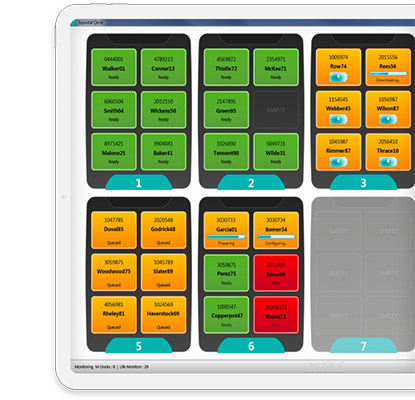
Standardise configuration, reduce user interaction, and keep study data moving. Equivital Qiosk is an automated software solution designed for large-scale studies using multiple devices, where consistency in configuration and fixed data parameters are critical.
Why teams choose Qiosk
- Built for consistency at scale: positioned for large-scale clinical trials using multiple devices where consistent configuration is paramount.
- Plug and play: devices are set up and pre-configured so you can provide them to participants ready for data capture.
- Complete automation via MDock: automatically charge and configure SEMs to pre-set criteria by docking; once collection is complete, data is automatically downloaded and extracted.
- Less operator handling: pre-configured configuration and download workflows can be initiated without the need for user interaction.
- Database-ready outputs: data can be automatically uploaded to a local or remote database in a custom extract format when necessary.
- Protocol repeatability: especially suitable where you need consistent operating protocols across multiple researchers, sites, or subjects.
- Patient-specific data: data is tied to a specific client ID in a GDPR-friendly way to support deeper analysis and ongoing study management.
- View data from anywhere: options to view data both remotely and locally for flexibility across teams and locations.
- Research + operations fit: intended for clinical trials and Black Ghost deployments where multiple SEMs and larger volumes of data must be managed.
How Qiosk fits into your workflow
- Configure once: set the study’s required parameters and preset criteria.
- Dock & prepare: plug SEMs into the MDock to automatically charge and configure them.
- Issue devices: provide pre-configured SEMs to participants ready for data capture.
- Return & extract: after collection, dock SEMs to automatically download and extract datasets.
- Upload (optional): automatically upload datasets to a local/remote database in a custom extract format where required.
Key details
- Manufacturer product code: EQ-SW-QSK-01
- Designed for: clinical trials and Black Ghost deployments managing multiple SEMs and larger amounts of data
- Automation focus: pre-configured SEM configuration and downloading initiated without user interaction
- Data handling: automatic upload to local/remote database; custom extract formats supported when necessary
Request a quote from J3Seven
J3Seven can help you scope a Qiosk deployment for your study—SEMs, docking workflow (MDock), database/extract requirements, and SOP alignment—so your organisation can scale data capture with confidence. Contact us for pricing and implementation guidance.
Frequently asked questions
What is Qiosk used for?
Qiosk is used to automate the configuration and data download workflow for multiple SEMs in large-scale studies, helping keep device settings consistent and data handling repeatable.
Does Qiosk require staff to manually run configuration and download steps?
Qiosk is designed with a pre-configured set-up where configuring and downloading data from a SEM can be initiated without the need for user interaction.
Can Qiosk support multi-site studies?
Yes. Qiosk is positioned as especially suitable where you need to maintain consistent operating protocols between multiple researchers, sites, or subjects.
Can Qiosk upload data automatically?
Yes. Data can be automatically uploaded to a local or remote database in a custom extract format when necessary.
How does Qiosk relate to eqView Professional and eqManager?
Qiosk focuses on automated device and data management at scale. eqView Professional supports real-time multi-subject viewing, while eqManager supports smaller-scale retrospective exports and device management. J3Seven can help you select the best-fit combination.