
Multi-Subject Physiological Data Monitoring and Analysis Software
Equivital eqView Professional
Equivital eqView Professional
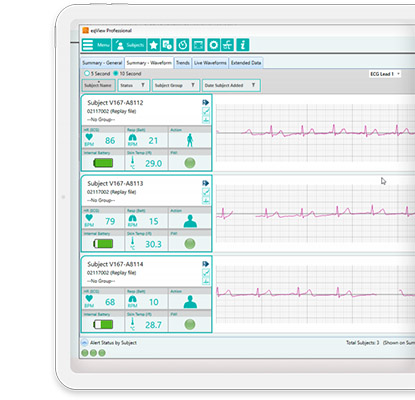
Oversee studies and clinical trials in real time—without sacrificing data granularity. Equivital eqView Professional is a monitoring and analysis platform that brings live data from multiple subjects into one view, giving research and operational teams fast access to the parameters that matter most.
Designed for Training and Research workflows, eqView Professional supports direct analysis from multiple subjects, high-resolution physiological data (including ECG and respiratory waveforms), and a configurable dashboard that can be tailored to each study or protocol.
Why teams choose eqView Professional
- Multi-subject oversight in one place: access real-time data from multiple ongoing studies in a single view.
- Direct analysis: analyse data from multiple subjects via Bluetooth connections using the Equivital dongle, or via Wi‑Fi when using the Equivital mobile app workflow.
- High-level, high-granularity data: well suited to clinical settings and trials where data granularity is required, including ECG and respiratory waveforms.
- Fully configurable: configure each SEM to the requirements of individual studies, experiments, or subjects to maximise re-use and consistency.
- Patient-specific data: data is tied to a specific client ID in a GDPR-friendly way to support deeper analysis of each study and subject.
- Unique dashboard: configure dashboards to display the parameters that are important to your project.
Live monitoring, plus replay for review
eqView Professional supports Live multi-subject viewing (with SEMs connected over Bluetooth for immediate viewing) and Replay of previously recorded files downloaded from a SEM—useful for post-session review and interpretation.
How it connects in the field or lab
- Bluetooth (PC/laptop workflow): connect multiple SEMs via the Equivital Bluetooth dongle for direct viewing and analysis.
- Wi‑Fi (mobile workflow): use eqView Mobile to view key data locally and forward data onwards to eqView Professional.
Where eqView Professional fits in the Training & Research suite
If your study requires broader configuration and data-management workflows, Equivital’s Training & Research range can also include tools such as eqManager, Qiosk, and eqView Mobile. J3Seven can help you choose the simplest configuration that meets your protocol and scale requirements.
Request a quote from J3Seven
J3Seven can help you scope the right eqView Professional setup—number of subjects, connectivity workflow (Bluetooth dongle vs eqView Mobile forwarding), SEM configuration requirements, and the best-fit Training & Research software mix for your study. Contact us for pricing, availability, and implementation guidance.
Key capabilities
- Multi-subject monitoring: view data from multiple subjects in one place.
- Waveform visibility: ECG and respiratory waveforms supported for higher-granularity review.
- Time synchronisation: multiple sensors can be time synchronised for cleaner analysis across subjects.
- Event markers: create session event markers during live sessions for easier interpretation and reporting.
- Configurable dashboards: tailor displays to each study’s required parameters.
- Product code: EQ-SW-EQV-P-1
Frequently asked questions
What is eqView Professional used for?
eqView Professional is used to access and analyse multi-subject physiological data in real time, with configurable dashboards and high-granularity outputs (including ECG and respiratory waveforms) for Training & Research and clinical-trial style workflows.
Can eqView Professional monitor multiple subjects at once?
Yes. It is designed to centralise real-time data from multiple subjects, supporting oversight across ongoing studies and sessions.
How does it connect to sensors?
Equivital describes direct connections via Bluetooth using the Equivital dongle, and Wi‑Fi when using eqView Mobile/mobile app workflows.
Is eqView Professional for medical diagnosis?
Equivital describes eqView Professional as non-diagnostic. It is intended for viewing and analysis workflows rather than diagnostic decision-making.
Can I review data after a session?
Yes. eqView Professional supports replay of previously recorded files downloaded from a SEM, supporting post-session review.